- Apex 85.1%
- JavaScript 14.7%
- HTML 0.2%
| Filename | Latest commit message | Latest commit date |
|---|---|---|
| .husky | ||
| config | ||
| force-app/main/default | ||
| manifest | ||
| scripts | ||
| .forceignore | ||
| .gitignore | ||
| .prettierignore | ||
| .prettierrc | ||
| eslint.config.js | ||
| jest.config.js | ||
| package.json | ||
| README.md | ||
| sfdx-project.json | ||

Skill Enhancement Tracker
Salesforce take-home project for a corporate training and skill development use case.
The project implements a Salesforce-native application that allows employees to enroll in skill enhancement sessions, tracks attendance and training hours, manages provider eligibility, supports participant confirmation through approvals, and surfaces operational metrics through reports, dashboards, and Lightning pages.
Table of Contents
- Overview
- Demo Videos
- Architecture Approach
- Data Model
- Business Process
- Automation
- Apex
- Reporting
- Lightning App
- Lightning Pages
- Security
- Demo Data
- Project Structure
- Manifests
- Deployment
- Retrieve
- Design Notes
- Future Improvements
- Repository Hosting
- Author
Demo Videos
Functional Demo
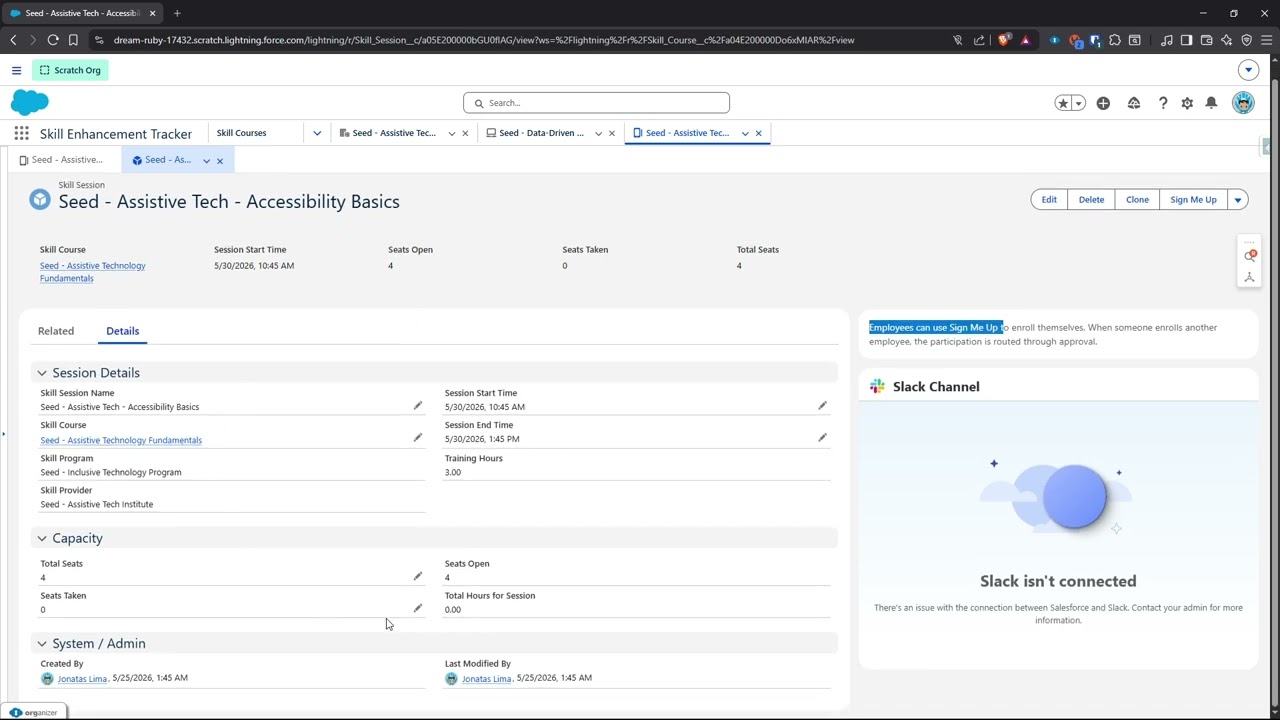
A short walkthrough of the final user experience: navigating the Skill Enhancement Tracker app, reviewing providers/programs/courses/sessions, signing up for a session, checking participant status, and viewing reports/dashboard metrics.
Technical Walkthrough
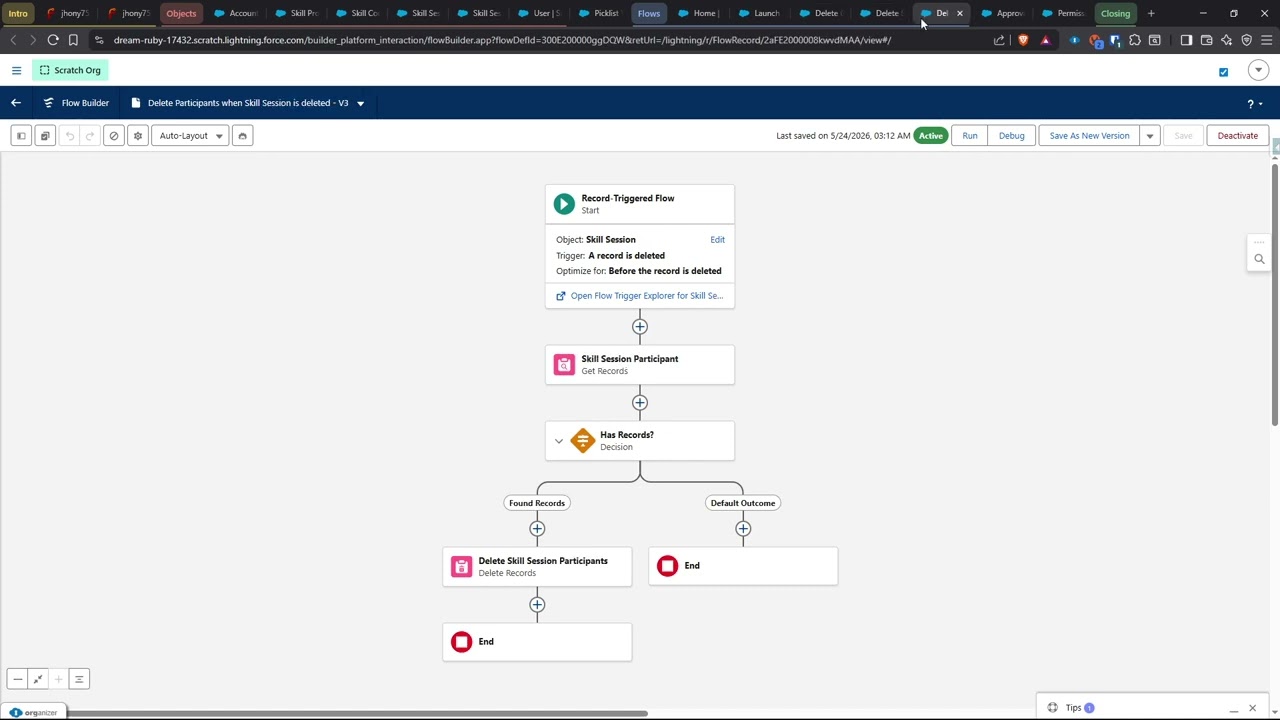
A technical explanation of the data model, automation strategy, approval process, reporting decisions, Lightning pages, security model, and Apex seat recalculation / participant integrity logic.
Overview
TechWave Solutions wants to track employee participation in skill enhancement programs offered by approved training providers.
This implementation focuses on:
- Salesforce-native data modeling
- Declarative-first automation
- Approval-driven participant confirmation
- Reports and dashboards for training visibility
- Lightning App and record page customization
- Security and access through Permission Sets
- A small Apex automation layer where platform constraints or cross-record integrity requirements made code the safer option
Architecture Approach
The solution was intentionally built with a declarative-first approach.
Most business logic is handled with Salesforce-native features such as:
- Custom Objects
- Custom Fields
- Record Types
- Page Layouts
- Lightning Record Pages
- Screen Flows
- Record-Triggered Flows
- Approval Processes
- Validation Rules
- Reports and Dashboards
- Permission Sets
Apex is used only where it adds clear value:
- Recalculating
Seats Takenin a bulk-safe way after participant changes. - Enforcing one participation record per user per session across UI, Flow, API, and Apex-created records.
- Ensuring participant record names are consistently derived from the selected User, even when records are created through Apex/data scripts.
This keeps the solution mostly declarative while still protecting critical data integrity rules at the platform layer.
Data Model
Standard Objects
Account
Used to represent Skill Providers.
Relevant metadata:
- Record Type:
Skill Provider Account - Field:
Skill Provider Status - Compact Layout:
Skill Provider Account Compact Layout - Page Layout:
Skill Provider Account Page Layout
Only approved Skill Provider Accounts are eligible to be selected by Skill Programs.
User
Used to represent employees who can participate in training sessions.
Relevant field:
Areas of Interest
This field uses the shared Areas of Interest global value set.
Custom Objects
Skill Program
Represents a training program offered by a Skill Provider.
Key relationship:
Skill Provider→ Account
Skill Course
Represents a course within a Skill Program.
Key relationship:
Skill Program→ Skill Program
Relevant fields:
Areas of InterestCourse DescriptionNumber of SessionsCumulative Open SeatsTotal Hours of SessionsSkill Provider Display
Skill Session
Represents a scheduled course session.
Key relationship:
Skill Course→ Skill Course
Relevant fields:
Session Start TimeSession End TimeTraining HoursTotal SeatsSeats TakenSeats OpenTotal Hours for SessionSkill Program DisplaySkill Provider Display
Skill Session Participant
Represents a user's participation in a specific Skill Session.
Key relationships:
Skill Session→ Skill SessionParticipant→ User
Relevant fields:
StatusTraining HoursSession Start TimeSession End TimeSkill Provider DisplaySkill Program DisplaySkill Course DisplayIs Participant
Supported statuses:
- Unconfirmed
- Pending Approval
- Confirmed
- Completed
- No-Show
- Canceled
Business Process
Self Sign-Up
Users can enroll themselves in a Skill Session through the Sign Me Up action.
The action launches a Screen Flow that:
- Creates a Skill Session Participant record.
- Assigns the current user as the participant.
- Associates the participant with the current Skill Session.
- Displays the success message:
Congratulations, you are signed up!
The backend participation flow then detects self-signup and confirms the participation.
Third-Party Sign-Up
If a user signs up another employee, the participant record is sent through an approval process.
Flow behavior:
- If
Participant = Created By, the participant is auto-confirmed. - If
Participant != Created By, the participant is set toPending Approvaland submitted for approval.
Approval behavior:
- Approved →
Confirmed - Rejected →
Canceled
Automation
Flows
The project includes the following flows:
Sign Me UpLaunch Skill Session ParticipationSet Participant NameDelete Participants when Skill Session is deletedDelete Sessions when Skill Course is deletedDelete Courses when Skill Program is deleted
The delete flows are used to compensate for relationship constraints where Master-Detail could not be used for every relationship due to Salesforce platform limits.
Approval Process
Approval Process:
Confirm Session Participation
Used to confirm participation when someone signs up another employee.
Validation Rules
The project includes validation rules for:
- Preventing a Skill Session from ending before it starts.
- Preventing overbooking when no seats are available.
- Preventing
Total Seatsfrom being lower thanSeats Taken.
Apex
Apex is used for participant data integrity and seat recalculation.
Files:
force-app/main/default/classes/SkillSessionParticipantTriggerHandler.cls
force-app/main/default/classes/SkillSessionParticipantHandlerTest.cls
force-app/main/default/triggers/SkillSessionParticipantTrigger.trigger
The trigger handles:
- Before insert/update participant validation.
- Preventing the same user from being registered more than once for the same session.
- Setting the participant record
Namefrom the selected User. - After insert/update/delete/undelete recalculation of
Seats Taken.
The implementation is bulk-safe and uses aggregate queries to avoid row-by-row recalculation.
Run tests with:
sf apex run test \
  --target-org <alias> \
  --tests SkillSessionParticipantHandlerTest \
  --result-format human \
  --code-coverage \
  --wait 10
Demo Data
The repository may include local Apex scripts under scripts/ for clearing and recreating demo data.
Typical usage:
sf apex run --target-org <alias> --file scripts/clearSeedData.apex
sf apex run --target-org <alias> --file scripts/seedData.apex
The seed data is designed to support the functional demo, including:
- Approved Skill Providers
- Programs and Courses
- Future and past Skill Sessions
- Confirmed, Pending Approval, Completed, No-Show, and Canceled participation examples
- A full session scenario where
Seats Open = 0
Reporting
Custom Report Types
The project includes two custom report types requested by the assignment:
Accounts with Skill Programs with Skill CoursesUsers with Skill Session Participant Records
The Account-based report type is useful for provider/program/course hierarchy reporting. Reports that depend on participant status and attendance hours use Skill Session Participant as the operational source of truth, because participation status lives at the participant level.
Reports
Reports are stored in:
Skill Program Reports
Included reports:
My Top Skill ProvidersMy Session Attendance Pending ApprovalMy Upcoming SessionsTop Skill ProvidersTop Skill Participants
Dashboard
Dashboard folder:
Skill Program Dashboards
Included dashboard:
My Skill Information Dashboard
Dashboard components:
- My Top Skill Providers
- My Sessions Needing Approval
- My Upcoming Confirmed Sessions
Lightning App
Application:
SkillEnhancementTracker
Included navigation items:
- Home
- Accounts
- Skill Programs
- Skill Courses
- Skill Sessions
- Skill Session Participants
- Reports
- Dashboards
Lightning Pages
The project includes customized Lightning pages for the application and key records.
Included FlexiPages:
Skill DataSkill Course Record PageSkill Session Record PageSkill Session Participant Record PageSkill Enhancement Tracker Utility Bar
The Skill Data app page surfaces:
- The main dashboard
- Top Skill Providers report chart
- Top Skill Participants report chart
- Recently viewed training records
Record pages were customized to emphasize relevant training data, related records, and contextual guidance instead of generic CRM activity components.
Security
Permission Set:
Skill Development Board
This permission set provides access to the relevant app functionality, fields, reports, dashboards, and administrative capabilities required by the training board users.
Project Structure
Important folders:
force-app/main/default/applications
force-app/main/default/approvalProcesses
force-app/main/default/classes
force-app/main/default/dashboards
force-app/main/default/flexipages
force-app/main/default/flows
force-app/main/default/globalValueSets
force-app/main/default/layouts
force-app/main/default/lwc
force-app/main/default/objects
force-app/main/default/permissionsets
force-app/main/default/quickActions
force-app/main/default/reports
force-app/main/default/reportTypes
force-app/main/default/roles
force-app/main/default/tabs
force-app/main/default/triggers
force-app/main/default/workflows
manifest
scripts
Manifests
This repository includes two manifest files:
manifest/package.xml
manifest/skilltracker.xml
manifest/skilltracker.xml
This is the intended project-specific manifest for the Skill Enhancement Tracker take-home assignment.
Use this manifest for reviewing, retrieving, or deploying the assignment deliverables.
Retrieve:
sf project retrieve start \
  --target-org <alias> \
  --manifest manifest/skilltracker.xml
Deploy:
sf project deploy start \
  --target-org <alias> \
  --manifest manifest/skilltracker.xml
manifest/package.xml
This is a broader generic manifest kept as a reference and convenience for full-org style retrieve scenarios.
For this assignment, manifest/skilltracker.xml is the authoritative manifest.
Deployment
Authorize an org:
sf org login web --alias skilltracker
Deploy the project-specific metadata:
sf project deploy start \
  --target-org skilltracker \
  --manifest manifest/skilltracker.xml
Run Apex tests:
sf apex run test \
  --target-org skilltracker \
  --tests SkillSessionParticipantHandlerTest \
  --result-format human \
  --code-coverage \
  --wait 10
Retrieve
To retrieve only the project-specific metadata from an org:
sf project retrieve start \
  --target-org skilltracker \
  --manifest manifest/skilltracker.xml
Design Notes
Master-Detail Constraint
The original assignment asks for cascading deletes and roll-up-style behavior across multiple relationships.
Due to Salesforce Master-Detail relationship limits, not every relationship could be modeled as Master-Detail. Where this constraint applied, the solution uses a pragmatic combination of:
- Lookup relationships
- Record-triggered flows for cascade-style deletes
- Apex-based recalculation for
Seats Taken
This keeps the solution aligned with Salesforce platform constraints while preserving the intended business behavior.
Report Type Tradeoff
The Account → Skill Program → Skill Course report type was created as requested and is useful for provider hierarchy reporting.
However, participant status and confirmed/completed attendance are stored on Skill Session Participant. Operational reports that require approval status, attendance status, participant identity, or confirmed hours are therefore based on participant-level reporting.
This preserves reporting accuracy instead of forcing reports into a hierarchy that does not contain the required transactional fields.
Declarative + Apex Boundary
The implementation keeps workflow routing declarative through Flow and Approval Processes, while using Apex for cross-record technical integrity.
This split was intentional:
- Flow remains easier for admins to inspect and modify for business process changes.
- Apex provides a consistent enforcement point for duplicate prevention, participant naming, and aggregate seat recalculation across all entry points.
Future Improvements
Given more time, the next improvements would be:
-
Friendlier Sign Me Up pre-checks
- Check for an existing participant registration before attempting record creation.
- Show a friendly message if the user is already signed up.
- Keep Apex duplicate prevention as the backend safeguard.
-
Seat availability pre-check in the Screen Flow
- Check
Seats Openbefore creating a participant record. - Show a clear “This session is full” message instead of relying only on backend validation.
- Check
-
Session timing pre-check
- Prevent sign-up after a session has already started.
- Surface a friendly message in the Screen Flow.
-
Additional lifecycle validation
- Prevent
CompletedorNo-Showstatuses before the session end time. - Define a stricter status transition model if the process becomes more formal.
- Prevent
-
Improved admin observability
- Add report/dashboard components for overbooked attempts, pending approvals aging, and provider utilization trends.
- Add an operational dashboard for the Skill Development Board.
-
More complete test data strategy
- Convert the demo seed scripts into a documented data setup process.
- Add stable test personas for repeatable demos and regression testing.
-
More explicit Flow fault handling
- Add fault paths with user-friendly messages in Screen Flows.
- Add administrative logging for unexpected automation failures.
-
Status governance
- Move status transition rules into Custom Metadata if the process becomes more complex.
- This would allow admins to adjust lifecycle rules without modifying Apex.
Repository Hosting
Primary repository:
Forgejo
GitHub can be configured as a mirror for visibility and redundancy.
Recommended setup:
Local repository → Forgejo → GitHub mirror
Author
Implemented by Jonatas Lima as part of a Salesforce take-home assignment.